Ask questions across your whole curriculum
Your teaching materials live in forty PDFs, a district drive, three binders you scanned in 2021, and a folder called "MISC - SORT LATER." You know the answer you need is in there somewhere. It's 9pm and you are not reading four hundred pages to find it.
Querent is a private library for your teaching documents. Upload your standards, lesson plans, unit guides, course syllabus, slide decks, and all other planning resources once, then ask questions the way you'd ask a colleague who had somehow memorized all of it:
Answers you can defend, not just answers
Every answer comes with numbered citations. Click one and you see the exact passage it came from, with the document name. When you're aligning an activity to a standard for a planning meeting, "the AI said so" is worthless, but "page 34 of the framework, here's the passage" holds up.
That's the difference between this and pasting things into a chatbot: Querent only answers from YOUR documents and shows its work, so you can verify everything against the source in one click.
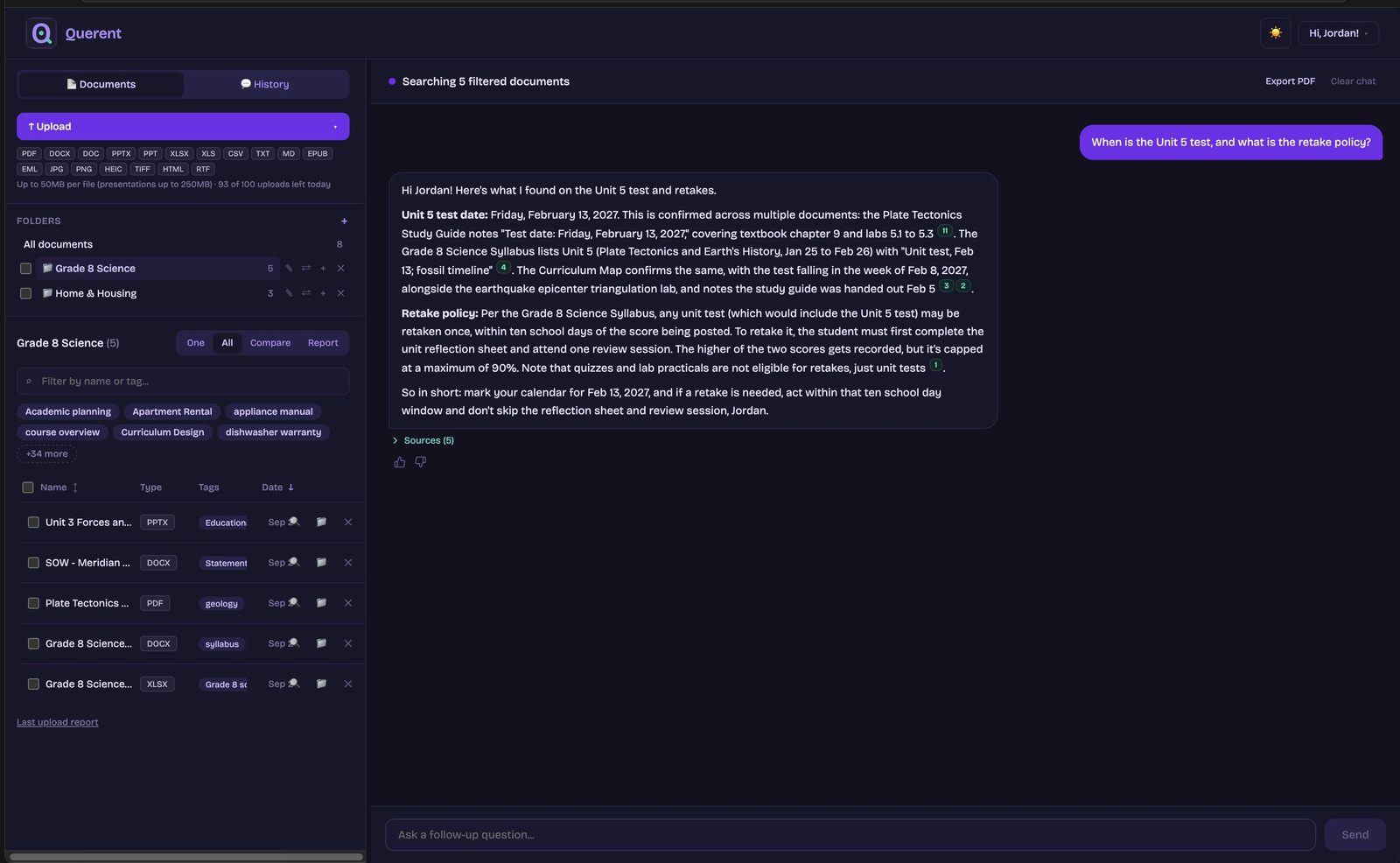
Built for how teaching materials actually exist
Ask across everything at once, compare documents side by side, or have it write a cited report across up to 25 documents. You can also generate a quiz or flashcards from any materials you choose, with every question citing the passage it came from.
Straight from Google Drive
Pick files in Google's own chooser and they import in one go; Docs, Sheets and Slides arrive as Word, Excel and PowerPoint. On a district-managed browser that blocks Google sign-in, drag in a folder from your computer or email files in instead; the structure comes with a folder.
Photos become searchable
A worksheet that only exists as a picture from your phone, or a binder you scanned years ago: Querent reads the text out of images.
Email things in
Forward an email with an attached PDF to your private Querent address and it files itself.
Clip from the web
Found a great article online? The browser clipper saves the readable part straight to your library.
Recordings, through their transcript
Have a recorded lesson or PD session? Zoom, Teams and YouTube all export a transcript. Attach it to the recording's entry and the session becomes searchable and askable, with citations. The video itself never leaves your computer.
Search the words, or ask the question
Type a word to find every document that mentions it, with the passage highlighted. Ask a question when you need an answer that pulls from several of them at once.
Your documents stay yours
Everything you upload is encrypted at rest, isolated to your account, and never used to train AI models, ours or anyone else's. Answering a question sends the relevant passages to Anthropic, and each document's text goes to Voyage AI once to make it searchable; both are named on our subprocessors page with exactly what each receives. Delete a document and its stored text is gone; answers you already received stay in your conversation history until you delete that conversation. Delete your account and everything goes with it, no email chain required. The full details are on our security page, written in plain English.
What Querent is, and what it isn't. This is a personal tool you buy yourself. It has no agreement with your school or district, so it isn't covered by whatever arrangements they have made for student records, and we don't claim it is. It is built for the materials you work from: curriculum, standards, lesson plans, and your own certification and continuing-education reading. Where a document identifies a student, your district's policy decides where that document can go, and this is not the tool to guess with.
What it costs, honestly
$10 a month, one plan, everything included. For the cost of a cup of coffee a month, save yourself hours of digging through your materials for that one thing, and stop re-buying resources you already own but can't find.
The 7-day free trial is the real product, and during the trial the upload limit is tripled so moving your existing materials in is painless. Cancel from your profile page in two clicks, no retention dance.
Start your free trialTakes about a minute. You're only charged if you stay past the trial.
Questions teachers ask us
How is this different from ChatGPT or NotebookLM?
Querent answers only from documents you’ve uploaded, cites the exact stored passage for every claim, and treats privacy as the product: encrypted at rest, never used for training. It’s a permanent, organized library, not a per-conversation upload.
Can it read scanned pages and photos?
Yes. JPG, PNG, HEIC, TIFF, and scanned PDFs all work. It reads the text out of images, so photographed worksheets and old scanned binders become searchable.
Is there a limit on my library?
No cap on total library size. Daily activity limits (100 uploads, 200 questions) keep the service fast and fairly priced; during your trial uploads are boosted to 300 a day.
What if it gets something wrong?
Every claim is cited, so you check the passage rather than trusting the summary. Answers come from your documents only. If it’s not in your materials, Querent says so instead of inventing something.