Your documents know more than you remember
Upload once. Ask anything. Every answer cites the exact passage it came from, and nothing you upload is ever used to train AI.
Free for 7 days, then $10/month
Everything you need to unlock your documents
Upload anything
PDF, Word, PowerPoint, Excel, email, images, ebooks, Markdown and more. If you have it, Querent can read it.
Ask across all your documents
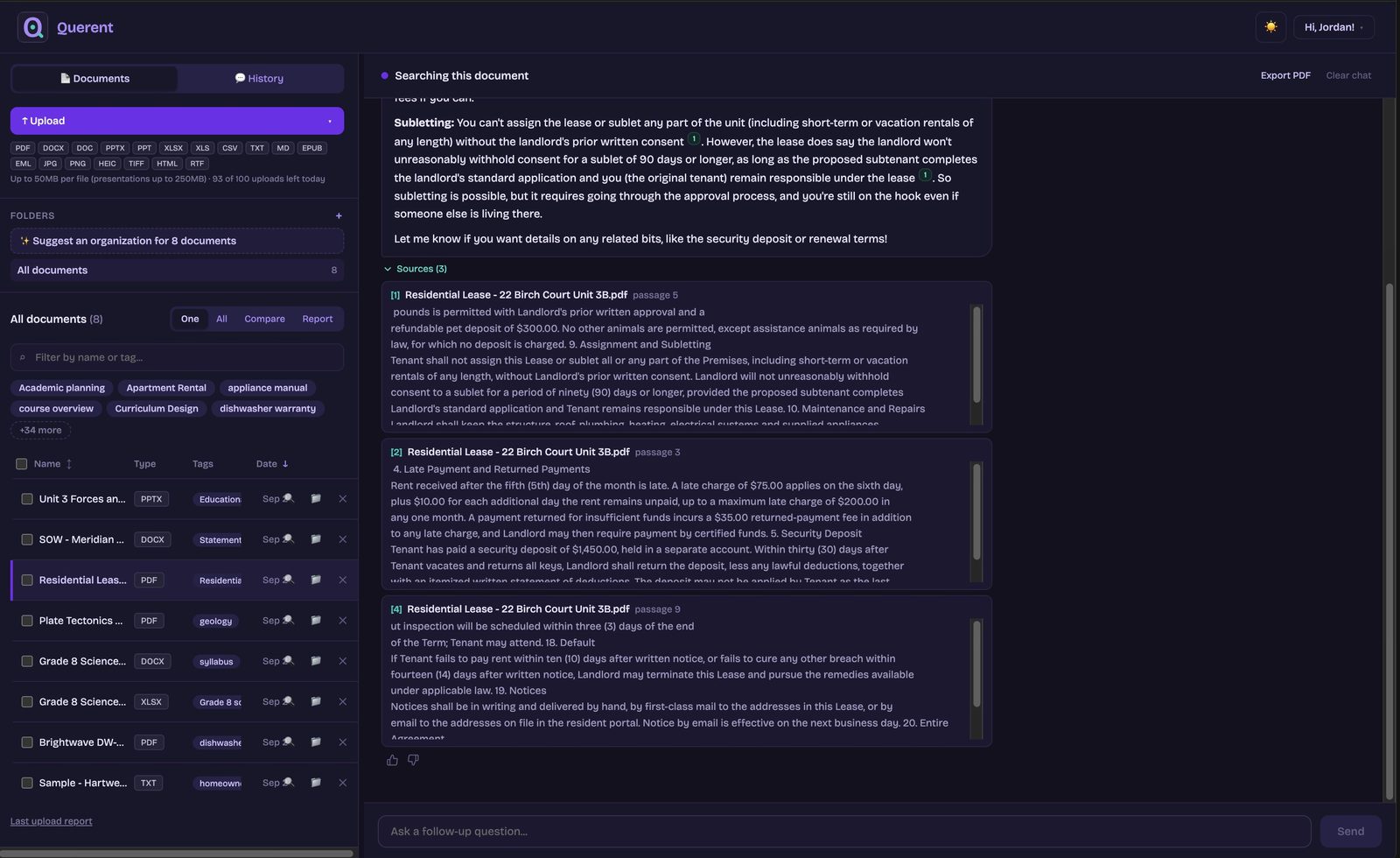
Stop searching. Start asking. Query one document or your entire library and get precise answers, each one citing the exact passages it came from.
Compare, report, or study
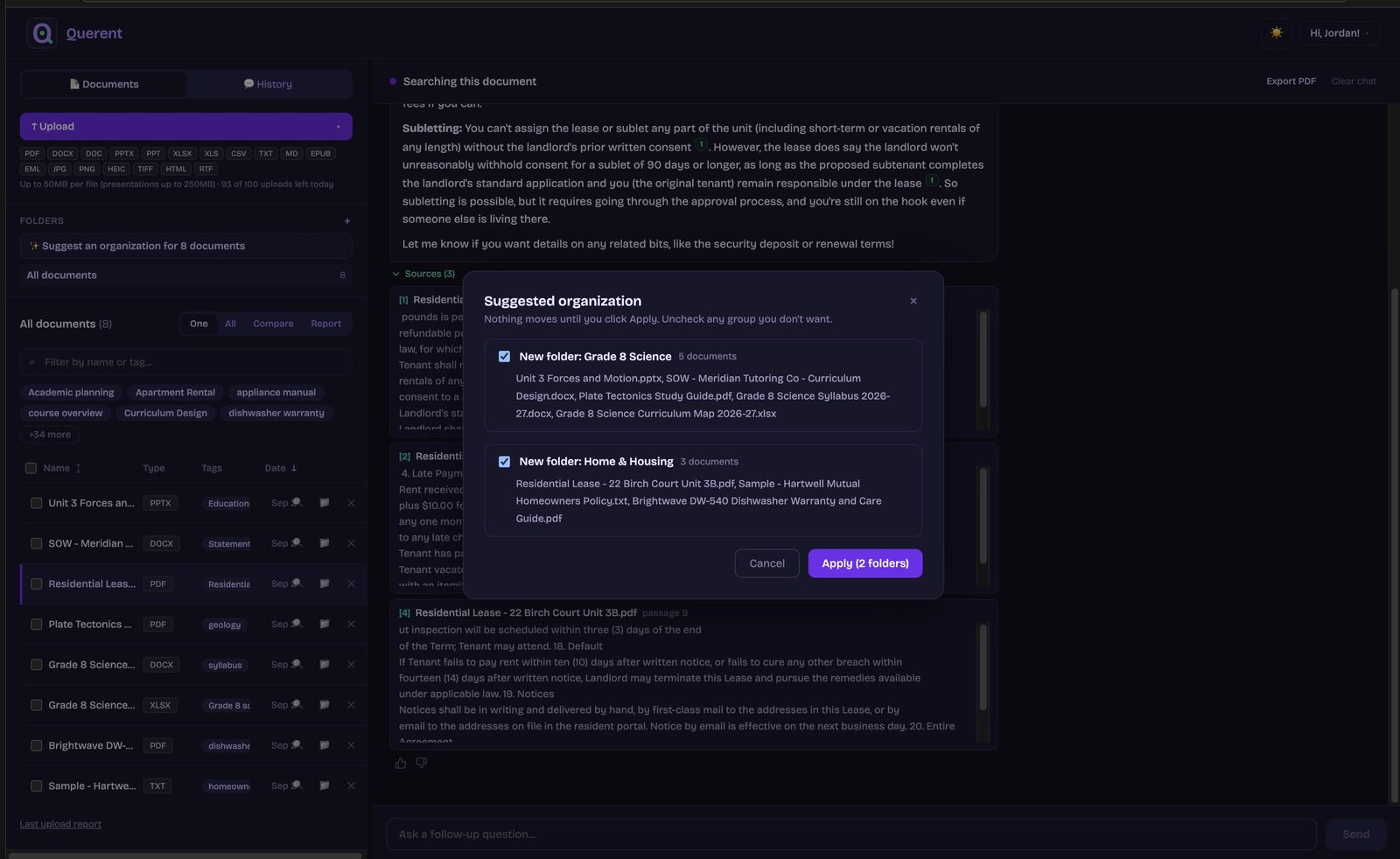
Select any documents and compare them side by side, turn the set into a structured, fully cited report, or generate flashcards, quizzes, and mind maps from it, with every item backed by the exact source passages.
Three steps to never losing an answer again
Upload once
Drag in files or folders, pick them from Google Drive, forward an email, or clip a web page. Querent reads it, encrypts it, and tags it automatically.
Ask anything
Question one document, your whole library, or compare files side by side. Plain language in, plain language out.
Trust the answer
Answers come only from your documents, never the open internet, and your content is never used to train AI.
Upload, ask, check the source
Twenty-six seconds, no sound: a renters policy goes in, one question comes back with four citations, and the Sources panel shows the passages behind them.
Your privacy is not an afterthought
Querent was designed from day one for people who upload things that matter: medical records, legal documents, financial files, and personal notes.
What we store
Encrypted text chunks and filenames, with keys held separately from the database
Your folders, tags, and conversation history, encrypted the same way
Search embeddings, the numerical fingerprints that make your documents findable by meaning
A timestamped audit log of your own account activity
What we never store
Your original files: they are read once, converted to encrypted text, and discarded
Your content in any AI training set, ours or our providers’
Anything after you delete: documents, chunks, and accounts are erased permanently
Your data in anyone else’s hands: never sold, never shared
Secure authentication
Email and password, magic links, and optional two-factor authentication. Sessions are authenticated with industry-standard tokens and expire automatically.
Full audit logging
Every upload, query, and deletion is recorded, so you always have a complete, timestamped record of everything that’s happened on your account.
Transparent AI usage
We name our AI providers: Anthropic’s Claude answers your questions and Voyage AI powers search. Questions send only the relevant passages, uploads send a short excerpt for tags and summaries (scans and photos are read in full to extract their text), and neither provider trains on any of it.
A word on judgment: We handle the technical side with encryption and strict access controls. On your side, we'd suggest keeping things like Social Security numbers, full account numbers, and passwords out of any document you upload, here or anywhere. Curious about the details? Our Privacy Policy and Terms of Service lay out exactly how your data is handled.
Handles all your common file types
No conversion needed. Just upload and start asking questions. Up to 50MB per file, presentations up to 250MB.
Browsing a page you want to save? The Querent Web Clipper saves it straight to your library, no separate download or HTML conversion needed. Get it for Chrome · Edge · Firefox
Or skip the browser entirely: every account gets a private Querent email address. Attach a file and send it in, and it shows up in your library automatically. Find your address on your profile page after you sign in.
Made for the paperwork you actually have
Querent earns its keep wherever the answer is buried in a pile of documents you own.
Ask questions across your whole curriculum: standards, units, assessment windows, and that one worksheet from March.
Insurance policies, leases, warranties, benefits booklets: know what your paperwork actually says before you make the call.
Contracts, SOWs, NDAs, vendor agreements: know what you signed, what you're owed, and when things renew.
Flashcards, quizzes, and mind maps built from the documents you actually have to learn, with the source on every item.
$10/month, after a 7-day free trial
A flat monthly price, never a usage bill. Generous daily limits keep things fair, and your profile shows where you stand anytime.
A library of any size, with files up to 50MB each (presentations up to 250MB)
Ask, search, compare, and generate cited reports across your library
Every answer cites the exact passages it came from
Google Drive import, email-in address, and the Web Clipper included
Encrypted in transit and at rest, export or delete everything anytime
Cancel before the trial ends and you won't be charged. Cancel anytime after.